Layers are one of the most important features in graphic design software. They may seem confusing at first, but once you start using them, everything quickly begins to make sense.
Think of a layer as a transparent sheet of paper. You can draw, paint, or place images on one sheet without affecting the others.
When you stack several transparent sheets on top of each other, they create one complete picture. However, each layer can still be edited separately.
For example, you might have:
– one layer for the background,
– another layer for your sketch,
– several layers for the base colours (many artists prefer to place each colour on a separate layer),
– several layers for shadows,
– and one layer for text, if you’re using any.
Because everything is separated, you can make changes without accidentally affecting the rest of your artwork.
If you make a mistake on one layer, you only need to edit that layer. The rest of your artwork stays exactly as it is. You can also move objects independently. For example, if you decide that a flower would look better somewhere else, you can simply move that layer without affecting the rest of the image.
You can add new layers as your project grows. In Procreate, however, the maximum number of layers depends on your iPad model and the resolution of your canvas. If you start running out of layers—or simply want to keep your project organised—you can merge layers together. However, only merge layers that you’re sure you won’t need to edit again.
Affinity Designer, on the other hand, allows an unlimited number of layers.
If you create animations in Procreate Dreams, you’ll use tracks instead of layers, although they serve a similar purpose.
Below is a screenshot from Procreate.
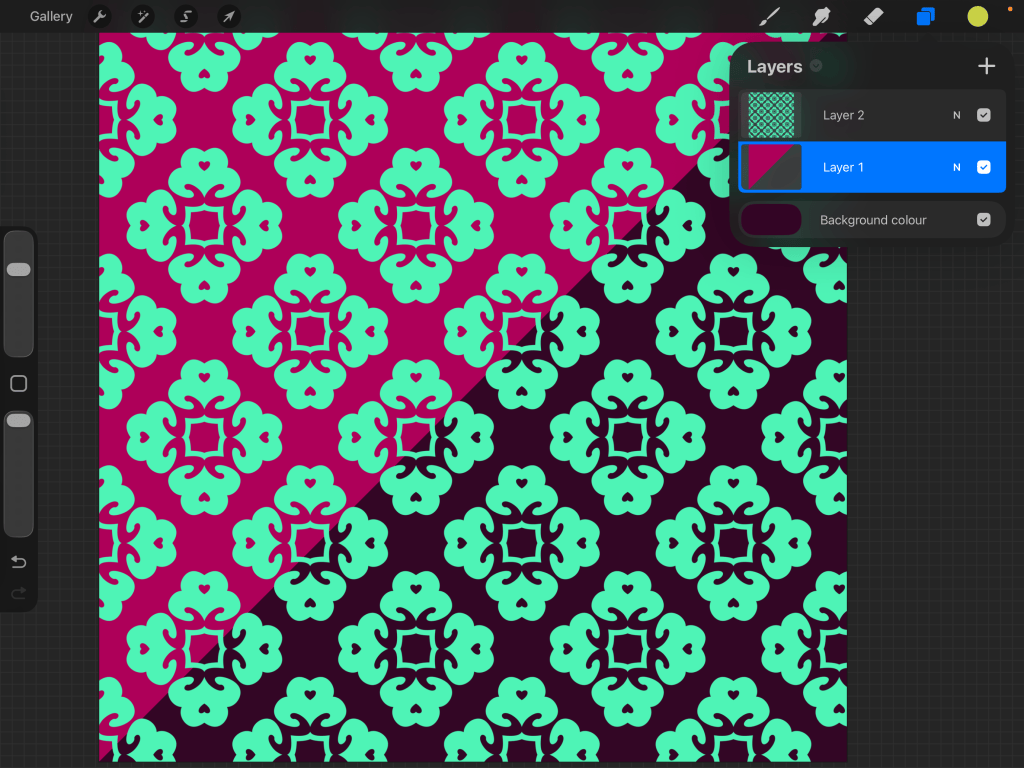
The Layers menu is located in the top-right corner. In this example, the artwork contains three layers: the background layer (created automatically by Procreate), a triangle, and a pattern. Notice that both the triangle and the pattern are placed on transparent backgrounds. We discussed transparent backgrounds in the previous post—creating individual elements on transparent backgrounds is considered best practice in graphic design because it gives you maximum flexibility when editing and reusing your artwork.


Leave a Reply